Clicks are counted when a post contains a Call to Action (CTA) or a link in the post description. A CTA or link encourages user engagement and directs them to additional content or actions (e.g., signing up for a newsletter, or visiting a product page).
Example: If a post includes a CTA button such as “Learn More” or a hyperlink in the description, and the user clicks it, this will count as click.
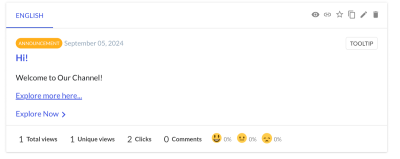
If a user clicks on the same link more than once (for instance, if a customer clicks on CTA from the topbar, and CTA from in-app, then it counts as two clicks.)
Note: Clicks and Views are distinct metrics. When a user clicks on a post from the Topbar and views it, this interaction is counted as a View. However, if the user then clicks on a Call to Action (CTA) within the post, that specific action is recorded as a Click.
How to add Click-able Content (CTA) in your Posts
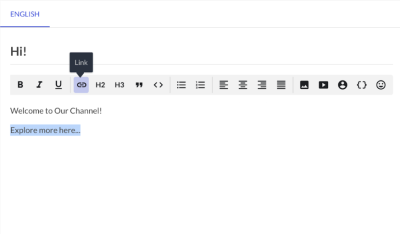
Option 1: Adding a hyperlink within the post.
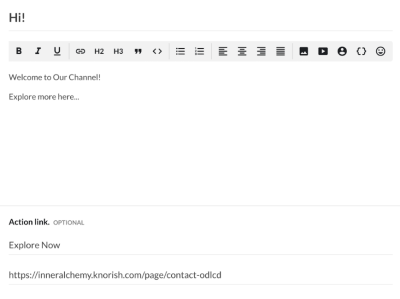
Option 2: Adding a link in the action link section
To know more about adding links to your post refer to Video:
Note: To ensure that views, unique views, and clicks are correctly tracked, make sure to always pass the user_id parameter, you can refer to more for the same in this article. This allows the system to accurately track and calculate the analytics for each user.
Why are my clicks low or zero?
A low or zero click count is usually expected, not a bug. The most common reasons:
The post has no CTA or link. Clicks are only counted on a Call to Action or a link in the post. A post with no link can be viewed many times and still show zero clicks — those are Views, not Clicks.
You’re comparing clicks to views. Views and Clicks are different metrics. Plenty of people read a post without clicking its link, so clicks are normally a fraction of views.
Links aren’t traceable (API installs). If you create posts through the API, clicks are only tracked when you pass
traceableLinks=truein the request. Without it, link clicks won’t be recorded. See How are Views, Unique Views, and Clicks counted via API?user_idisn’t being passed. Always send theuser_idparameter so interactions are attributed correctly. See How to send user data to the Beamer script.
If clicks are still zero after checking these and you’re sure users are clicking a real link, contact our support chat so we can take a look.