Which language does the Adoption Agent answer in?
By default, the Adoption Agent answers in the language the user writes in. One agent can serve users in different languages, so you don't need a separate agent per language for that.
To make an agent always answer in one language instead, change its language setting in the agent builder (under Language settings and training frequency).
Show a different Adoption Agent for each language
If you want each language to have its own Adoption Agent, you can show a different agent to each group of users in the Resource Center.
Create one Adoption Agent per language. In each agent's language setting, choose that language. Train and publish each one.
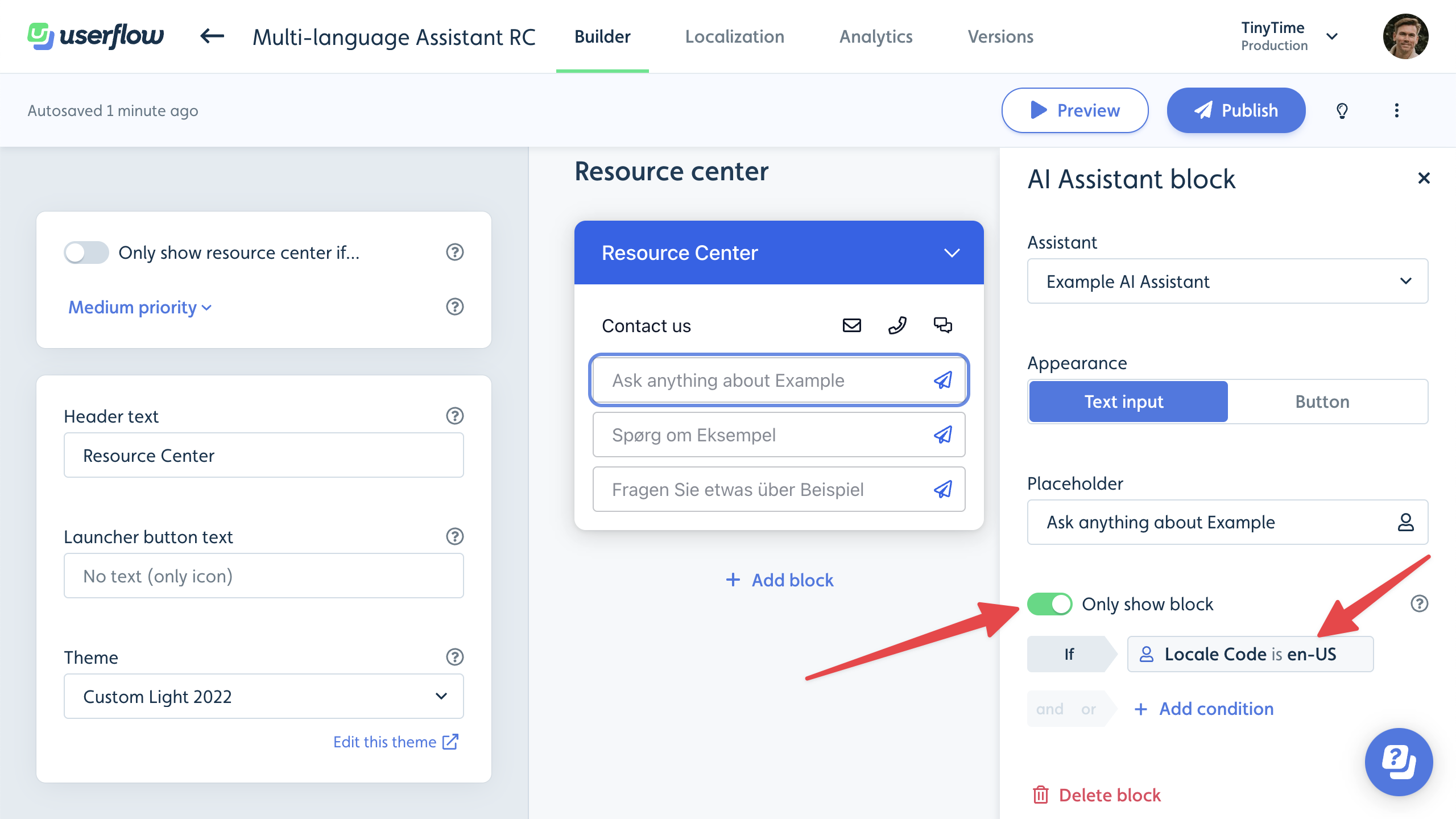
In your Resource Center, add an Adoption Agent block for each language and choose the matching agent.
On each block, turn on Only show block if and add an Attribute condition.
Select the Locale Code attribute and set it to the locale code for that language, for example
frorde-DE.
Each user then sees only the Adoption Agent for their locale.
Privacy Assurance and Adoption Agent
Userflow does not use AI inputs to train, fine-tune, or otherwise improve public large language models. However, to maintain the highest standards of data security, we strongly recommend training your Adoption Agent on non-sensitive data and instructing users not to submit any sensitive or private information in their Adoption Agent searches. Refer to our Terms of Service for additional details.